![[1 & 2 PLAYER] Grapple Cart Obby Wiki logo](/images/site/logo.webp)
Start with one shared cart
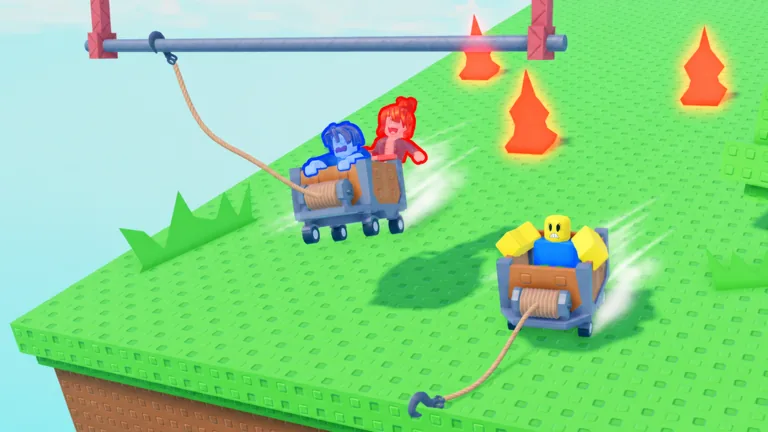
Join the same Roblox server, choose the two-player cart, and wait until both avatars are seated before moving. The game supports a shared cart, so a rushed launch costs both riders the attempt. Agree on the first anchor and landing while the cart is still stationary.
If you cannot find your friend, solve that before boarding. Confirm that both of you see the same players nearby, then look for the two-player entry. Lobby labels and placement can change, so use what the game currently displays instead of following a memorized screen position.
Agree on the next action before moving
Two people can both see an anchor, but they may not choose the same moment to use it. Pick a simple callout: target, then timing. One rider points out the structure ahead; the other confirms that the cart has a clear route and a landing area. If the game assigns different controls to each seat, test those roles on a safe stretch before reaching a gap. Do not assume one seat always handles the hook across every device or update.
Use a short sequence for the first attempt:
- Wait until both players are actually in the cart.
- Look ahead for a visible support and a place the cart could land.
- Say which target you intend to use.
- Move only when both players are ready.
- After the crossing, pause long enough to check the next obstacle.
That is less exciting than firing at the first thing you see. It is also easier to repeat after a mistake. A recorded two-player session spends plenty of time reboarding and calling out missed shots; the useful lesson is to make the next attempt deliberate.
Handle a missed hook together
If a shot misses, avoid competing inputs. First check whether the cart is still moving and whether the hook is attached. If you still have room to steer or slow down, use the controls currently shown in your game. If the cart is stuck or the run has ended, use the game’s displayed reset or respawn option and regroup in the lobby. A player’s spoken keybind in a video is helpful as a clue, but your on-screen controls are the reliable reference for your platform.
The same caution applies to braking. An independent guide reports that the two-player cart lacks a brake in one captured session, while another player speaks about a brake-like action. Those observations are not enough to promise a brake in every mode. Test any brake control in a safe section before you rely on it near an edge.
Make the second attempt count
After a failure, name just one thing to change: the anchor, the timing, or the cart’s approach. Changing all three at once makes it hard to tell what worked. If another cart is in the way, give it space before committing to the same narrow route. If your partner is still rejoining, wait instead of turning a two-person run into a solo launch.
For the cart and hook themselves, read the grapple hook guide next. If you would rather practice without coordinating, the solo guide starts with the same visible cart and anchor decisions.
FAQ
Can two people ride one cart?
Yes. The official title advertises a two-player mode, and official art shows two avatars in one cart.
Do both players need to join the same server?
Meet in the same live session before looking for a shared cart. If you cannot see each other, check the server or use the game’s current friend-join interface.
Which player uses the grapple?
Check the controls shown to each rider after boarding. The available material does not establish a permanent seat-to-control rule.
Is there a brake in two-player mode?
Do not depend on one until you test the current build in a safe area. Player reports differ, and the available account does not settle the rule.
What should we do after a crash?
Use the displayed reset or respawn option, meet again, then change one part of the failed approach before restarting.