![[1 & 2 PLAYER] Grapple Cart Obby Wiki logo](/images/site/logo.webp)
Take the first run slowly
Start with the cart you mean to use, then look for a place to hook and somewhere the wheels can land. Grapple Cart Obby has solo and two-player carts, and its images show a front rope spool, elevated supports, and hazards. Spend your first short run learning the controls shown on your own screen before trying to clear a long section.
Choose the solo option if you want to test the cart without coordinating with another rider. Choose the two-player option when a friend is in the same server and both of you are ready to share a cart. Check the live lobby for its current labels; the exact screen arrangement can change.
Build a simple test loop
Find a section where a mistake is cheap. Before pressing anything near a gap, look at the cart and the structure ahead. The hook in official art attaches above the cart, so try to identify a visible support and a plausible landing area. Then test the displayed grapple control once and watch what happens to the rope and vehicle.
Run the same small experiment again if the first result is unclear. Changing your aim, speed, and timing all at once makes the result hard to read. A useful learning loop is:
| Attempt | Change only this | What to watch |
|---|---|---|
| First | Use a visible target | Does the rope attach, miss, or release? |
| Second | Adjust when you fire | Is the cart earlier or later over the gap? |
| Third | Adjust approach speed | Can you still see the landing before committing? |
This is practice advice, not a promise that every pictured surface accepts a hook. Let the live game tell you which structures work. If an input prompt differs from another player’s video, follow the prompt on your device.
Read the scene before the cart moves
The promotional images show several distinct situations: a bright green platform with orange pointed objects, a blue elevated ramp, and a cave with lava below a suspended cart. Those are visual warnings, not a verified map order. Before each obstacle, identify three things: the near edge, a likely anchor, and the far landing. If you cannot see the landing, wait for a better view instead of firing blindly.
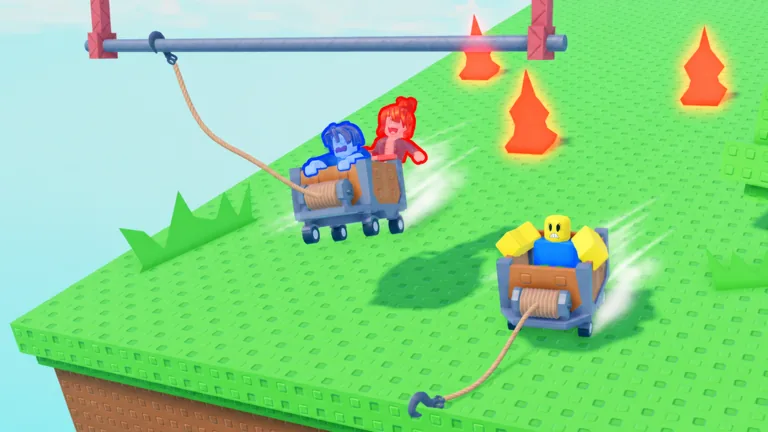
Do not assume that the orange objects and lava have identical collision rules. Treat both as reasons to take a controlled line until you see the current game’s response. Precise stage counts, checkpoint locations, and damage values are not established by the official page.
Turn failure into a useful next attempt
If the cart gets stuck or a jump fails, use the reset or respawn option displayed by the current client. One two-player run of this game includes several resets and reboardings, which is normal for learning a cart route. Before you restart, say what caused the attempt to fail: missed target, late shot, obscured landing, or another cart in the way. Pick one adjustment.
Once you can make a controlled first crossing, use the grapple hook guide for anchor choices or the two-player guide to coordinate with a friend.
FAQ
Is this a solo game or a two-player game?
Both options are named in the official title. The first official image also shows one rider in one cart and two riders in another.
What should I learn first?
Learn how your cart moves and how your current client activates the hook. Then practice choosing an anchor and a landing.
Which key fires the grapple?
Use the control shown in your current game. A player mentions a key in one recorded session, but that does not establish every platform’s binding.
Does a missed attempt erase progress?
Check the current respawn or checkpoint behavior in game. The game page does not confirm save or checkpoint rules.
Should I rush the first ramp?
Take enough time to see its far side and the next landing. The blue ramp is shown in official art, but no exact speed requirement is documented.